 Transcripts
The overlay
The live transcript is a file you go and read. The overlay is the opposite: a small panel that floats over your call and shows you the two or three things worth knowing without you looking away from the meeting.
It is off by default. Turn it on in Settings → General → Overlay.
What it shows
At rest it is a small glass pill under the menu bar showing the last thing said, straight from the transcript. No summarizing stands between the room and that line, so it keeps up with the conversation — it is how you tell at a glance that the thing is listening, and roughly where everyone is.
Hover it and it opens. At the top is the topic being discussed, and under that, three lanes covering that topic:
- Where it landed — the conclusion this topic reached. The one to look at when you have lost the thread.
- Facts & figures — numbers, dates, names, owners, deadlines, as they were stated. The three most recent.
- Last question — what was asked, with the answer underneath if one exists, and where it came from.
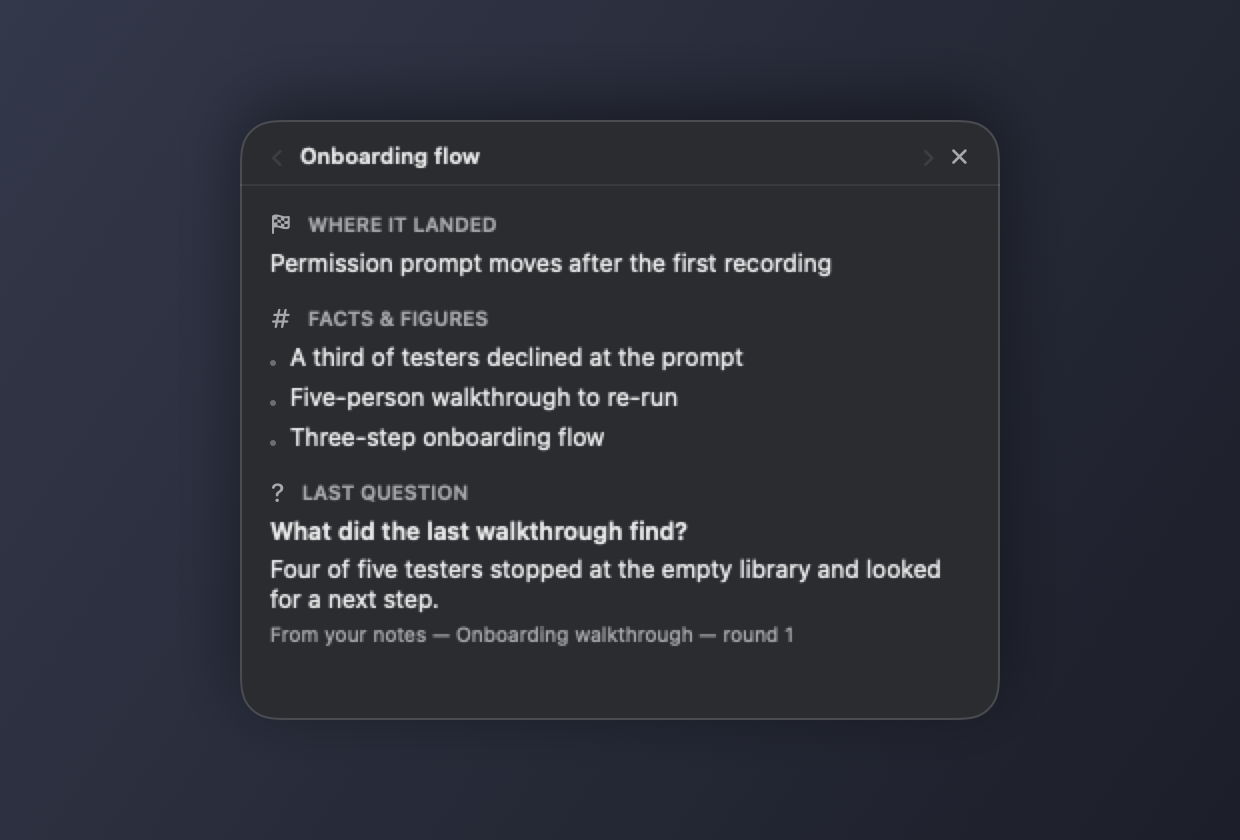
Each lane holds only its most recent useful item. That is deliberate: mid-call you are not catching up on history, you are asking one specific thing, and a scrolling log of everything is the wrong shape for that.
Drag the pill anywhere you like; it stays there. Click the ✕ to hide it for the rest of the call, and bring it back from the menu.
Topics
A meeting is not one conversation. It opens with the weather, gets to the thing everyone joined for, doubles back, and ends somewhere else again. An overlay that pooled all of that into one list would still be showing you the weather an hour later, because nothing in a flat list ever stops being recent enough to drop.
So the overlay follows the subject. When the conversation moves on, the lanes move with it and show the topic that is on the floor now. The stretch you just left is not thrown away — it is a page back. Use the arrows either side of the topic name to go through the ones before it; the counter underneath says where you are, and marks the live one.
Two things it deliberately does not do:
- It does not split on a tangent. A subject has to hold for two readings before it counts as a new topic. Someone answering a side question and coming straight back does not carve the meeting into fragments.
- It does not list the same subject twice. Come back to pricing after twenty minutes on something else and you return to the pricing page rather than starting a second one.
Paging back pins you there. New topics can open while you read; you stay put until you page forward to the live one again.
Because the lanes are per topic, a figure someone raises again under a new subject shows up again — it is repeated because it now bears on something else, and that is worth seeing. Repeating it inside the same topic is not, and is filtered out.
Where answers come from
This is the part worth understanding, because it is the part that makes the overlay trustworthy rather than merely impressive.
An answer can come from exactly two places:
1. Earlier in the same call. Someone gives a number at minute four and asks for it again at minute forty; the overlay has it. 2. Your notes — the Markdown files under your transcripts folder, if "Search my notes for answers" is on.
Every answer says which one, and when. An answer from the call is stamped with the moment it was said. An answer from a note names the note.
It will not answer from anything else. The model is used to phrase an answer out of text that was retrieved first — it is never the source. If nothing in the call or your notes bears on the question, the overlay shows the question with "Not answered in this call or your notes" underneath and stops there.
That restraint is deliberate. On a live call, in front of other people, a confidently invented answer is worse than a blank panel. So the overlay is built so that it cannot produce one: an answer that does not hold up against the passage it was drawn from is thrown away before you ever see it.
What it does not do
- It is not a caption track. Answers take a few seconds, and during a fast stretch it will fall behind. It is something to glance at, not to read.
- It does not know anything about the world — only about your call and your notes.
- It does not send anything anywhere. See Privacy.
If it stays empty
- Nothing is being transcribed. The overlay is fed by the live transcript; if that is not running, there is nothing for it to work with. macOS 26 or later is required.
- No language model is available. With neither Apple Intelligence nor a local model, the overlay drops to quoting: it finds the passage that best matches the question and shows it verbatim with its source, rather than phrasing an answer. In that mode the conclusion and facts lanes stay empty, because there is nothing to read the conversation with. Settings shows which backend is in use, and the log says so at the start of every recording.
- Nothing has landed yet. "Nothing settled in this topic" and "No numbers or names in this topic" mean exactly that. Ten minutes of easy conversation with no decisions and no figures in it will leave both lanes empty, and that is the honest answer. Check the pages either side before concluding the overlay missed something — it may be filed under the topic it was said in.
- Your notes are somewhere else. Only Markdown files under your transcripts folder are searched.
Next: Your transcripts